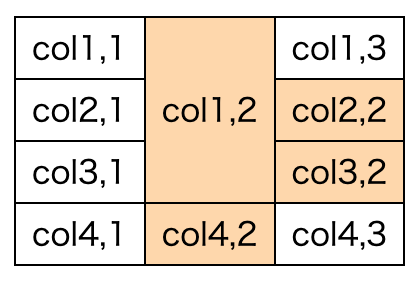
rowspan、colspanがあるとtd:nth-of-type などがズレてしまう。
html
<table>
  <tr>
    <td>col1,1</td>
    <td rowspan="3">col1,2</td>
    <td>col1,3</td>
  </tr>
  <tr>
    <td>col2,1</td>
    <td>col2,2</td>
  </tr>
  <tr>
    <td>col3,1</td>
    <td>col3,2</td>
  </tr>
  <tr>
    <td>col4,1</td>
    <td>col4,2</td>
    <td>col4,3</td>
  </tr>
</table>
2列目に色をつけたいのに、col2,2とcol3,2にも色がついてしまっている。本来はこうなってほしい↓
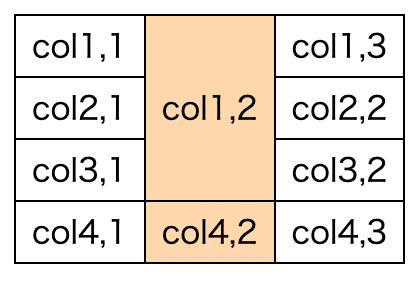
これをするには第一正規化してやればよい。正規化する関数 normalizeTable の実装はこちら。
const normalizeTable = (table: HTMLTableElement) => {
  const rows = table.querySelectorAll<HTMLTableRowElement>('tr');
  const tableCells = Array.from(rows).map((row) =>
    Array.from(
      row.querySelectorAll<
        HTMLTableDataCellElement | HTMLTableHeaderCellElement
      >('td, th'),
    ),
  );

  for (let r = tableCells.length - 1; r >= 0; r--) {
    const row = tableCells[r];
    if (!row) continue;
    for (let c = row.length - 1; c >= 0; c--) {
      const cell = row[c];
      if (!cell) continue;
      if (cell.rowSpan === 1 && cell.colSpan === 1) continue;
      for (let i = 0; i < cell.rowSpan; i++) {
        for (let j = 0; j < cell.colSpan; j++) {
          if (i === 0 && j === 0) continue;
          tableCells[r + i]?.splice(c + j, 0, cell);
        }
      }
    }
  }
  return tableCells;
};
tableCells[row][col] には見た目の位置どおりのtd要素が入っている(rowspanが指定されたtdは複数箇所に入ってる)。あとは、normalizeTable を使って適当にクラスを振ってやればよい。
const cells = normalizeTable(document.querySelector('table'))
for (const row of cells) {
  for (let i = 0; i < row.length; i++) {
    row[i].classList.add(`col${i}`);
  }
}
これで td.col1 に背景色をつけてやれば意図した通りにうごく
